Audio Forge 1.4.9: Custom Category Icons and Ambiance Ducking
Audio Forge 1.4.9 adds custom category icons (use any PNG, JPG, or SVG) and automatic ambiance ducking that reduces background sounds when music plays, giving you professional-level control without manual adjustments.
- authors
- Slashpaf
- published
Audio Forge 1.4.9 delivers two features that make your soundboard more personal and more professional: Custom Category Icons and Ambiance Ducking. Upload your own images to represent categories (castles, dragons, swords—whatever fits your campaign), and let the app automatically balance music and ambiance so you never have to ride volume sliders mid‑session.
Custom Category Icons: Your Images, Your Categories
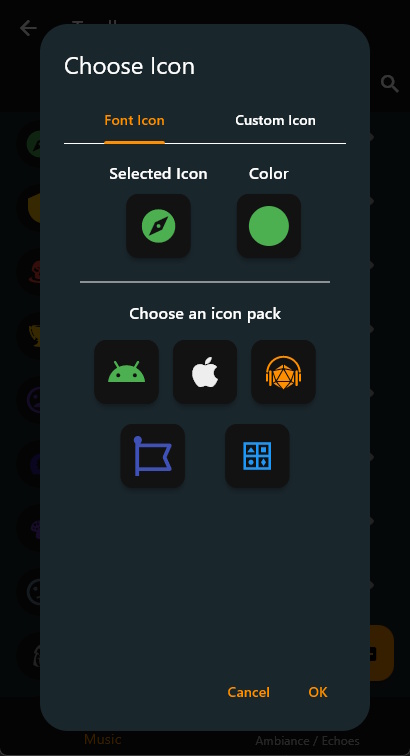
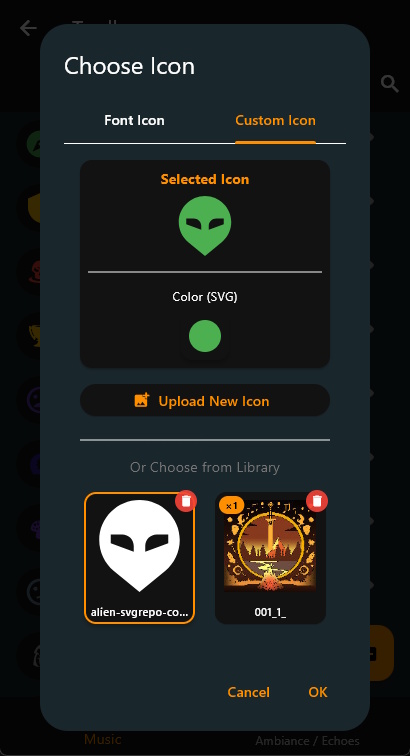
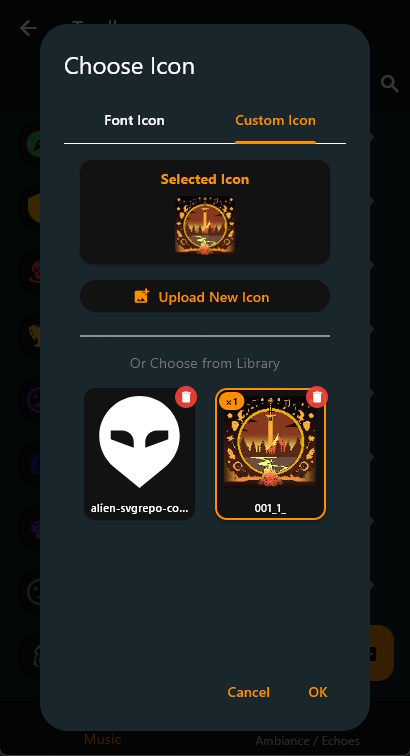
Until now, categories used font icons from Material Icons, Font Awesome, Cupertino, and Line Awesome. That’s hundreds of options, but sometimes you want that exact dragon illustration or your campaign’s heraldic crest.
Now you can upload PNG, JPG, or SVG files as category icons:
- Upload any image.
- Automatic optimization: PNG and JPG files are resized to 128×128 pixels for performance; SVGs stay crisp at any size.
- Safe fallback: Every category keeps a font icon as backup, so if the custom icon file is missing or corrupted, you still see something.
- Portable: Custom icons travel with library exports and work across Windows, Android and iOS.
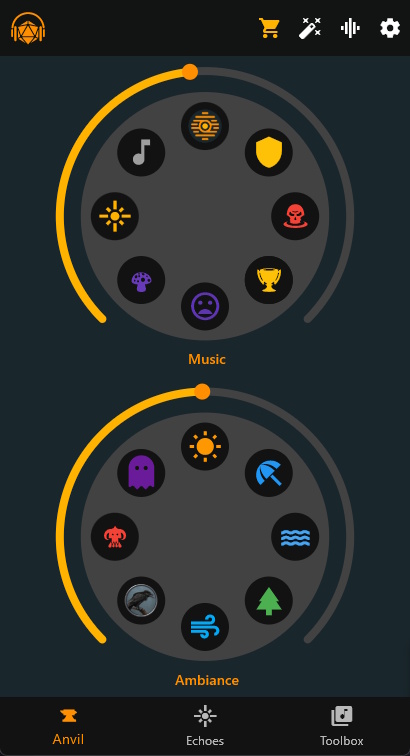
How to Use
- In the Toolbox, edit any category (or tap + to create a new one).
- Tap the Icon button.
- Switch to the Custom Icon tab in the icon picker.
- Tap Upload New Icon and select a file.
- The new icon is immediately added to your custom icon library and used for your category.
The icon is saved with a unique filename (based on the category’s ID) and automatically optimized. If you ever want to change it, just upload a new one. To revert to a font icon, simply select the Font Icon again.
The icons are saved in your icon library, and can be kept unused and reused later.
Ambiance Ducking: Set‑and‑Forget Audio Balance
Ducking is a classic audio mixing technique: when music plays, background ambiance automatically lowers so the music stays clear. Radio stations do this for announcements. Podcasts do it when the host speaks. Now Audio Forge does it for your TTRPG sessions.
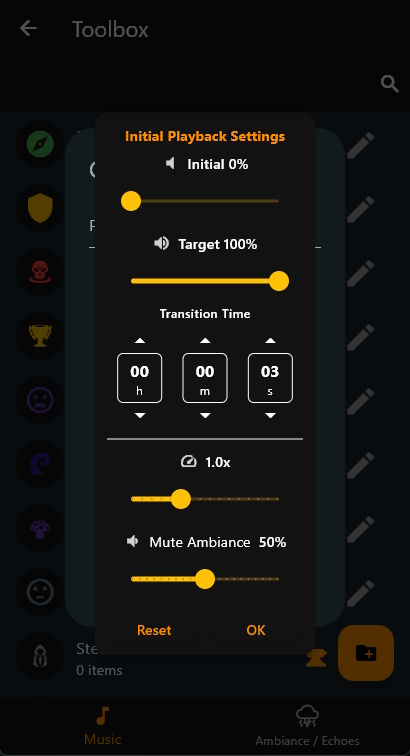
In 1.4.9, every Music category can specify a ducking percentage (0–100%). When that music plays, all ambiance categories reduce to that percentage of their current volume. When the music stops, ambiance smoothly returns to full volume. No manual adjustments, no interrupting your flow to tweak sliders.
How It Works
Example: Dramatic Boss Fight
- You set “Epic Battle” music to 70% ducking.
- You have “Wind” and “Distant Thunder” ambiance playing at 80% volume.
- You start “Epic Battle.”
- The ambiance drops to 30% of 80% (effective volume ≈ 24%).
- Music stays clear, ambiance stays present but subdued.
- When the fight ends and music stops, ambiance smoothly returns to 80%.
Setting Ducking Percentage
- Open the Toolbox and edit a Music category.
- Find the Mute Ambiance slider in the category *Settings.
- Set the percentage:
- 0% = No ducking (ambiance at full volume).
- 50% = Ambiance reduced to half.
- 100% = Ambiance completely silent.
- Tap Update to save.
All transitions are smooth (0.5–3 second fades), so there are no abrupt volume jumps.
Use Cases
High ducking (70–100%):
Intense music where ambiance should fade into the background—boss fights, dramatic reveals, climactic moments.
Medium ducking (40–60%):
Balanced layering—forest ambiance with gentle flute music, cave sounds with mysterious chanting, ocean waves with sailing shanties.
Low ducking (10–30%):
Subtle background music that blends with ambiance—tavern music, travel themes, peaceful exploration.
No ducking (0%):
Music and ambiance at equal levels—when the music itself is atmospheric, or you prefer manual control.
Why It Matters for GMs
- No mid‑session fiddling: Set ducking once per music category, then forget about it. The app handles the mix automatically.
- Professional polish: Your audio sounds balanced and intentional, like a movie soundtrack.
- Creative control: Different music categories can have different ducking levels—soft music barely touches ambiance, epic music pushes it to the background.
- Non‑destructive: Your configured volumes never change. Ducking is temporary and automatic.
Get Audio Forge 1.4.9
Update now and personalize your categories with custom icons, then let ambiance ducking handle your audio balance:
Have feedback or want to share your custom icons? Join the community on Discord.
If you’re new to Audio Forge, it’s a flexible, GM‑friendly soundboard for TTRPGs that makes it easy to organize libraries, layer music and ambiance, trigger one‑shots, and save full scenes with State Links. 1.4.9 adds visual personalization and automatic audio mixing so you can focus on the story, not the controls.